Improved support for non-latin languages

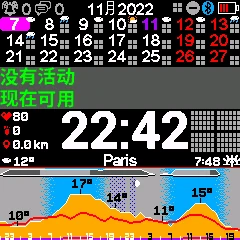
KairosEye now properly renders non-Latin character sets — meaning your calendar events, weather descriptions, and interface elements display correctly regardless of your language.
The Challenge
Garmin watches support dozens of languages, but building a watchface that handles all of them is harder than it sounds. Latin-based scripts (English, French, German, Spanish) are straightforward — the character set is compact, the glyphs are similar in width, and the layout math is predictable. Non-Latin scripts are a different story. Japanese and Chinese characters are wider and require different font rendering. Arabic reads right-to-left. Korean has complex syllable blocks. Each script has its own spacing rules, line-breaking behavior, and display constraints — all on a screen that might be only 260 pixels wide.
What's Now Supported
You can now use KairosEye with full rendering support for:
- Japanese — kanji, hiragana, and katakana
- Chinese — Simplified and Traditional
- Korean — Hangul syllable blocks
- Arabic — right-to-left layout
- Russian — Cyrillic characters
- ... and more scripts as Garmin adds language support From calendar event titles to day-of-week labels to weather conditions — everything is rendered in your selected language with proper encoding and layout.
Why It Matters
KairosEye has users on every continent. When your Monday morning meeting shows up as □□□□ instead of the actual title because the watchface can't render your language, the whole point of having a calendar on your wrist breaks down.
This update ensures that every user sees their data the way it was meant to be displayed — in their own language, with their own script, without compromise.
How to Enable It
There's nothing to configure. KairosEye reads your watch's language setting automatically. If your Garmin is set to Japanese, your events will render in Japanese. Switch to Chinese, and the display adapts. Just make sure your Garmin firmware is up to date — some older firmware versions have limited font support for certain scripts.
This was one of the most requested features from our international users. If your language isn't rendering correctly yet, let us know — we want KairosEye to work for everyone.
 — The KairosEye Team