Visual Calendar Indicators

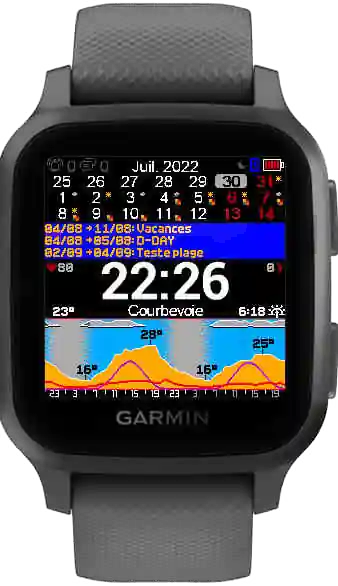
Your calendar now includes visual indicators — small but meaningful additions that make it easier to read and understand your schedule without touching your phone.
The Problem with Plain Text Events
On a small watch screen, a list of event titles doesn't tell you much. "Team sync" and "Dentist appointment" look the same, even though one is a routine 15-minute call and the other requires you to leave the office. Without context, you're scanning titles and mentally sorting priorities — which defeats the purpose of having your schedule on your wrist in the first place.
What Visual Indicators Add
Visual indicators use color codes, icons, and visual tags to give you instant context:
- Color-coded events — different colors for work, personal, and other calendar categories, so you can tell them apart at a glance
- Status icons — quick recognition of event types like meetings, reminders, or deadlines
- Visual hierarchy — the most important or imminent events stand out, while less urgent ones stay readable but quieter The goal is simple: you should be able to understand your next two hours by looking at your wrist for three seconds.
How It Works
The indicators are generated automatically based on the metadata in your calendar events — category, timing, and duration. There's nothing to configure. If your calendar app assigns colors or categories to events, KairosEye picks them up and translates them into the watch display. For calendars without categories, events are styled based on proximity — the closer an event is, the more visual weight it gets.
Small Screen, Smart Choices
Designing for a watch screen means every pixel matters. We tested several approaches before landing on this one — the balance between information density and readability is tricky, and we wanted indicators that help without adding clutter. The result is subtle but effective: your schedule becomes scannable instead of just readable.
We're continuing to refine this feature based on your feedback. If you have ideas on how visual indicators could work better for your workflow, let us know.
 — The KairosEye Team